
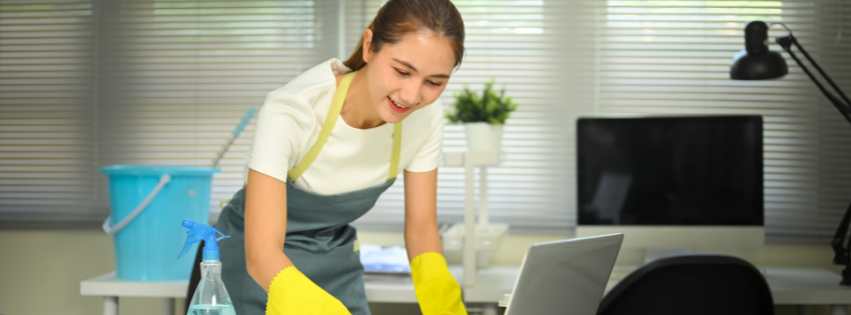
A clean home office isn’t just about appearance — it directly affects focus, productivity, and even the lifespan of your equipment. Dusty desks, smudged screens, and cluttered workspaces can quickly become distractions. Electronics add another layer of concern, since improper cleaning can cause damage or shorten their lifespan.
This guide covers practical, real‑world methods for cleaning a home office while protecting electronics. Whether you handle cleaning on your own or rely on residential cleaning Trophy Club Texas professionals, these steps help keep your workspace clean, organized, and safe.
Why Home Offices Need Special Attention
Unlike other rooms, home offices combine everyday dust with sensitive equipment. Computers, keyboards, printers, and monitors attract dust through static electricity. Paper clutter also traps particles that circulate through the air.
Homes that schedule weekly house cleaning Trophy Club services often notice their home offices stay cleaner and more functional because dust and buildup never have time to settle deeply.
Start With Power and Safety
Before cleaning any electronics, always power them down and unplug them. This protects both you and the equipment. Allow devices to cool before wiping them, especially monitors and laptops.
Professional teams providing house cleaning Trophy Club TX services follow this same safety-first approach when cleaning office spaces.
Dusting Without Harming Electronics
Dust is the biggest enemy of home office equipment. Removing it correctly prevents overheating and performance issues.
Use Microfiber Cloths
Microfiber cloths lift dust without scratching screens or surfaces. They’re ideal for desks, monitors, and office furniture and are commonly used during deep cleaning Trophy Club appointments.
Avoid Spraying Liquids Directly
Never spray cleaner directly onto electronics. Instead, lightly dampen a cloth if needed. This is a standard practice for any professional cleaning service Trophy Club that works around sensitive equipment.
Cleaning Screens Safely
Screens require gentle care. Use a dry or slightly damp microfiber cloth and wipe in one direction. Excess pressure can damage screen coatings.
Regular screen maintenance is often included during move-in cleaning Trophy Club and move out cleaning Trophy Club, when offices need to be clean but electronics must remain protected.
Keyboards, Mice, and Small Devices
Keyboards and mice collect crumbs, oils, and germs faster than most people realize.
- Turn keyboards upside down and gently tap to remove debris
- Wipe surfaces carefully with a lightly damp cloth
- Allow devices to dry completely before reconnecting
Homeowners searching for house cleaners near me Trophy Club frequently ask about safe ways to clean these high-touch items.
Desk Organization and Paper Control
Cluttered desks trap dust and make cleaning harder. Reducing paper piles improves airflow and keeps surfaces easier to maintain.
A tidy workspace also makes affordable house cleaning Trophy Club services more effective by allowing cleaners to focus on detailed surface care instead of moving excessive clutter.
Floors and Air Quality in the Office
Office floors quietly collect dust that can be pulled into electronics through vents and fans. Vacuuming regularly — especially under desks and cords — helps protect equipment.
Consistent floor care, combined with weekly house cleaning Trophy Club, improves air quality and keeps the office feeling comfortable.
When Professional Cleaning Makes Sense
Home offices with multiple devices or long gaps between cleanings often benefit from professional care.
A reliable professional cleaning service Trophy Club has the experience to clean office spaces safely without risking damage. This is especially helpful during deep cleaning Trophy Club visits or before hosting meetings at home.
Renters often schedule move out cleaning Trophy Club to ensure home offices are clean, organized, and inspection-ready.
Home Office Cleaning as Part of Whole-Home Care
A clean office supports productivity and reduces stress. That’s why office spaces are often included in detailed residential cleaning Trophy Club Texas services.
Pairing occasional DIY upkeep with recurring maid service Trophy Club TX visits keeps home offices consistently clean without added effort.
A Realistic Office Cleaning Routine
Most home offices don’t need daily deep cleaning. A practical routine — light dusting weekly, screen care as needed, and regular floor cleaning — keeps everything under control.
Busy professionals often combine personal upkeep with scheduled maid service Trophy Club TX support to maintain a clean, functional workspace year-round.
Final Thoughts
Cleaning a home office requires a balance between thoroughness and caution. With the right tools and techniques, it’s possible to protect electronics while keeping the space clean and inviting.
Whether you’re maintaining your office between visits or preparing for move-in cleaning Trophy Club or move out cleaning Trophy Club, safe home office cleaning helps protect your equipment and supports a more productive work environment.
Contact us at 817–577–9977 or visit https://allstarmaids.com/ to book your service.